Web Extension
Extending Elumity Into Your Research Workflow
Elumity's browser extension bridges the gap between online research discovery and your organized research library, enabling direct import of academic sources while you browse research databases and scholarly websites.
The extension transforms passive web browsing into active library building by detecting academic content on supported sites and providing immediate import capabilities without disrupting your research flow.
Installation and Setup
Either install the extension during onboarding or find the Elumity Web Importer in your Browser's extension store! It's available for popular browsers including Chrome, Firefox and Safari.
After installation, the Elumity icon appears in your browser toolbar, providing immediate access to import capabilities whenever you encounter relevant academic content online.
Supported Research Platforms
The extension integrates with major academic databases and research platforms where scholars typically discover sources for their research projects.
PubMed integration enables direct import of biomedical literature with complete citation information and PDF access when available through your institutional subscriptions.
Google Scholar support allows import of academic papers across disciplines, including citation counts and related work suggestions that help expand your literature review coverage.
arXiv compatibility provides access to preprint servers, particularly valuable for staying current with emerging research in rapidly developing fields.
Institutional database support works with many university library systems and subscription databases, enabling import while you conduct research through your institution's resources.
Understanding Import Detection
When you navigate to supported academic websites, the extension automatically detects available content for import into your Elumity library.
The extension identifies individual papers, entire search result sets and related materials that can be imported simultaneously, saving time during comprehensive literature review processes.
Visual indicators show which content is available for import, whether PDF full-text is accessible and how the content will integrate with your existing Elumity organization structure.
Import Selection and Organization
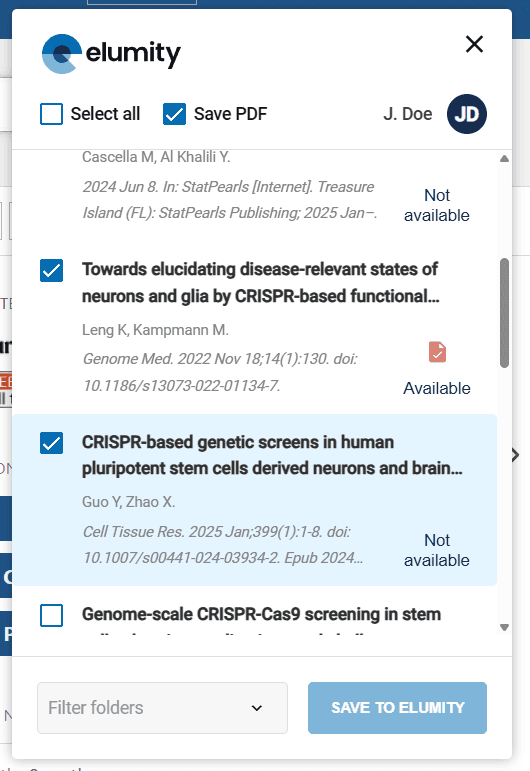
The extension window displays detected content with essential information including titles, authors, publication dates and availability indicators for PDF downloads.
Strategic Content Selection
Review detected content carefully to ensure imported materials align with your research objectives and quality standards. The extension makes it easy to import large quantities of content, but selective importing maintains library quality.
Use the preview information to assess content relevance before importing, considering factors like publication date, author credentials, journal reputation and abstract content when making selection decisions.

Folder Integration
Connect imports directly to your existing Elumity folder structure by selecting appropriate destinations before beginning the import process.
The extension displays your complete folder hierarchy, enabling precise organization that maintains the categorical structure you've established for your research materials.
Create new folders within the extension interface when you discover content that requires new organizational categories, ensuring your library structure evolves to accommodate new research directions.
Batch Import Capabilities
The extension supports efficient batch importing for comprehensive literature reviews or when building extensive reference collections around specific research topics.
Multiple Article Selection
Use selection tools to choose multiple articles simultaneously, either through individual selection or bulk selection options that enable efficient import of entire search result sets.
Monitor import progress through the extension interface, which shows download status for each selected item and provides feedback about any import issues that require attention.
PDF Integration
When institutional access or open access policies provide PDF availability, the extension can import both citation information and full-text documents simultaneously.
This integrated approach ensures your Elumity library contains both properly formatted references and the actual source materials needed for detailed research analysis.
Quality Control During Import
Maintain library quality by reviewing imported content and verifying that citation information meets academic standards appropriate for your research level.
Citation Verification
Check that imported citations include complete bibliographic information including author names, publication dates, journal titles, volume and page numbers and DOI information when available.
The extension imports citation data as provided by source databases, but institutional database quality varies, making post-import verification an important quality control step.
Organizational Review
After importing, review how new content integrates with your existing library organization and adjust folder assignments or create new organizational structures as needed to maintain logical research material groupings.
Integration with Research Workflow
The browser extension enhances rather than replaces your existing research discovery processes by providing a clean connection between online exploration and organized library building.
Literature Review Support
During systematic literature reviews, the extension enables efficient collection of relevant sources while maintaining the organizational structure needed for comprehensive analysis.
Import search results from multiple databases into dedicated literature review folders, creating comprehensive collections that support thorough academic analysis.
Reference Management Enhancement
Imported citations integrate immediately with Elumity's reference management system, ensuring consistency between your library organization and citation practices in academic writing.
The seamless integration means sources imported through the extension become immediately available for citation in Knowledge Cards.
Next Steps
With browser extension capabilities established, explore other advanced features in the help hub to enhance your research productivity.